Alternative Firewall Architectures within a Network
Firewall-protecting a node running Windows
Refer to the network's topology. We want to do an experiment using 3 nodes-- node0, node2, and node4. We will protect (i.e., prevent access to) a service on Windows node4 by placement of a firewall in 2 alternative locations. First, on node4 itself which can self-protect using the Windows firewall. Second on linux node2, the router through which node0 must pass to reach node4. The purpose is to illustrate that within a network topology firewalls can collectively have their own topology and different firewall architectures can be designed.
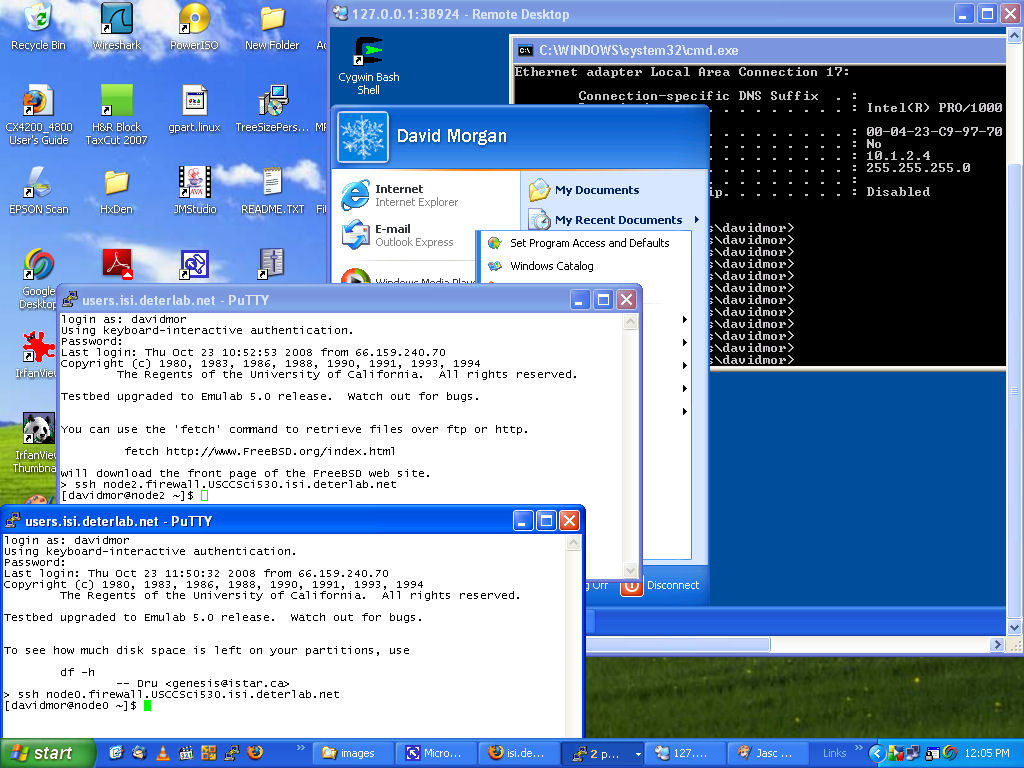
Gain simultaneous access to all 3 nodes, in a separate window for each on your screen. Access the 2 linux nodes, node0 and node2, in the manner you used earlier by ssh'ing into users.isi.deterlab.net and from there ssh'ing into the nodes themselves. Access Windows node 4 per these intructions. Once you are all set, you screen should look something like this:
Eliminate firewalls
First let's eliminate any firewall rules that may be in place on our 2 linux nodes. You must be root. If not, do:
sudo su
Then on each of the linux nodes:
iptables -F
On the Windows node:
Start/Control Panel/Security Center/Windows Firewall/Off (not recommended)/OK button
Turn on a service to protect
It doesn't matter what service we use. Let's use telnet. Now that a telnet server is running on node4, connect to it from node0 using a telnet client ( if it isn't already there, install it: yum install telnet ). In node0:
telnet 10.1.2.4
A login prompt comes to you from the telnet server (note that IP routing is auto-set by DETER and you can presume it) . Your node0 interface should look like:

Good. You now have something to firewall. There's no need to actually log in. Just get out of the remote session (ctrl-]), then "quit" out of the local telnet client back to your local shell:

Protecting the service
Protecting the telnet service on node4 with a firewall means preventing (certain) clients from reaching it. There are different ways to do that, both in terms of what to prevent (only telnet? everything on a certain NIC? only certain source IPs?) and in terms of placement of prevention. First let's use Windows' own firewall to protect Windows' telnet service. Then we'll remove Windows' firewall, and go over to node2 to erect a linux firewall that will protect Windows' telnet service from there. In Windows:
Start/Control Panel/Security Center/Windows Firewall/On (recommended)/OK button
The default firewall will drop incoming packets to port 23. Try to connect from node0 as you did before. The result is different:

Without removing the Windows firewall, let's adjust it to permit just telnet connections narrowly:
Start/Control Panel/Security Center/Windows Firewall/Exceptions tab/Add port
button
(supply telnet for Name, and 23 for Port number)
OK button
Now try again to telnet from node0. Your success is restored.
With the way clear as far as node0 and node4 are concerned, move to node2 by selecting its terminal window on your local desktop. We'll put a blockage here. On node2:
iptables -A FORWARD -p tcp --sport 1024:65535 --dport 23 -s 0.0.0.0/0 -d 10.1.2.4/32 -j DROP
This says "add a rule to the forwarding chain that drops tcp packets addressed to 10.1.2.4's port 23." Such packets will arrive at node2 when node1 tries to telnet to node4 again, but now node2 discards them rather than cooperate. Verify by returning to node0 and again experiencing failure/timeout.
Note the difference in purpose between the 2 firewalls. Windows' firewall is a self-defense measure. The node2 iptables firewall is selfless. node2 has separate INPUT and OUTPUT chains that regulate what can pass in or out of its NIC interfaces. Our rule, in the FORWARD chain, has no effect on that. Only on NIC-to-NIC hand-off willingness of already-arrived packets. Windows' firewall, conversely, has no role in regulating forwarding nor egress/outlet of any packets. It is strictly an input firewall. Nevertheless, based on their placement, we were able to use either one for the same purpose in this example. Network administrators make such choices routinely.